
Do not reach for a plugin yet.
Distortion in a master has five common causes. They sound similar through a laptop speaker and they need completely different fixes. Guess wrong and you will make the song worse while feeling like you did something.
So the first job is finding where it starts.
Play the mix on its own, before any mastering
If the distortion is already there, stop. It is a mix problem and nothing downstream will fix it.
Bypass the limiter
If it goes away, the limiter is working too hard. That is cause two.
Solo the low end
Filter out everything above about 200 Hz. If the ugliness is down there, it is a low end problem.
Check the true peak
Set a meter to true peak. If it reads above 0 dBTP, you have found it.
Convert to MP3 and listen again
If it only appears here, the encoder is the trigger and the true peak is the cause.
Worth knowing: more than one of these can be true at the same time. Fix them in this order, listening after each one, or you will not know what helped.
Cause one: the mix was already clipped
This is the most common one, and the most annoying, because by the time you hear it in the master the damage is permanent.
A digital file has a hard ceiling. Push a wave past it and the top of the wave is not squashed, it is cut off. Where there was a rounded peak there is now a flat edge, and a flat edge is a burst of harmonics that were never in the music.
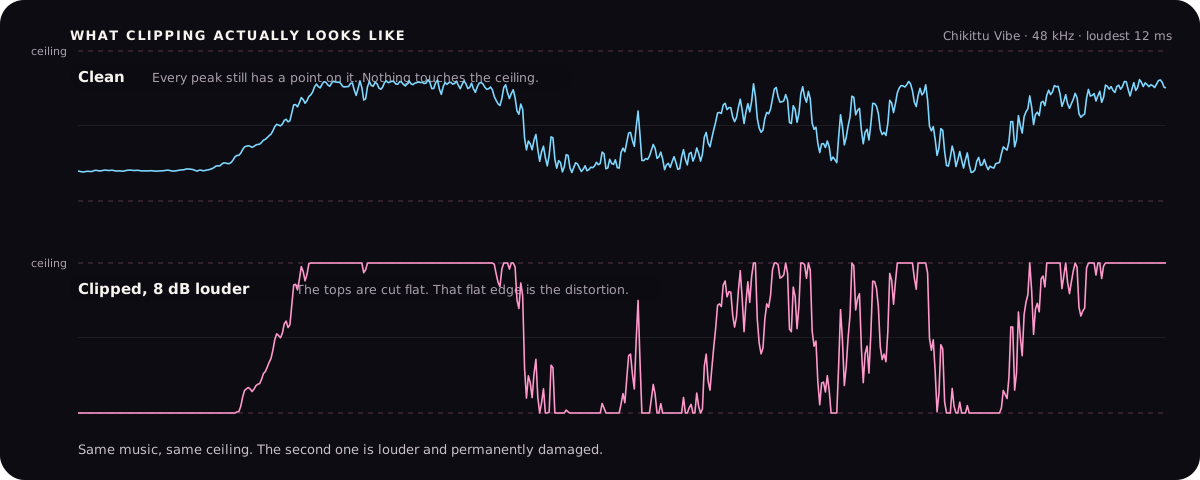
How to tell: play the mix on its own with no mastering. If it is already there, it is here. Look at the mix in your editor and zoom right in on the loudest part. Flat tops mean clipping.
The fix is in the mix session, not the master. Pull the master fader down until nothing hits the ceiling, then export again. If the mix bus has a clipper or limiter on it purely for loudness, take it off. If the clipping is on one instrument, fix that instrument.
A trap to avoid: exporting at 32-bit float hides clipping rather than preventing it. The numbers survive above the ceiling in the file, then clip the moment anything converts them to a normal format. Turn the level down, do not rely on the format.
Cause two: the limiter is working too hard
A limiter holds the peaks down so you can turn the whole song up. Ask it for a decibel or two and you do not hear it working. Ask it for six or eight and you hear everything.
What it sounds like: the kick loses its front edge and turns into a thud. The vocal ducks down every time the kick lands. Cymbals get a fizzy edge. The whole song breathes in and out in a way that gets tiring after a minute.
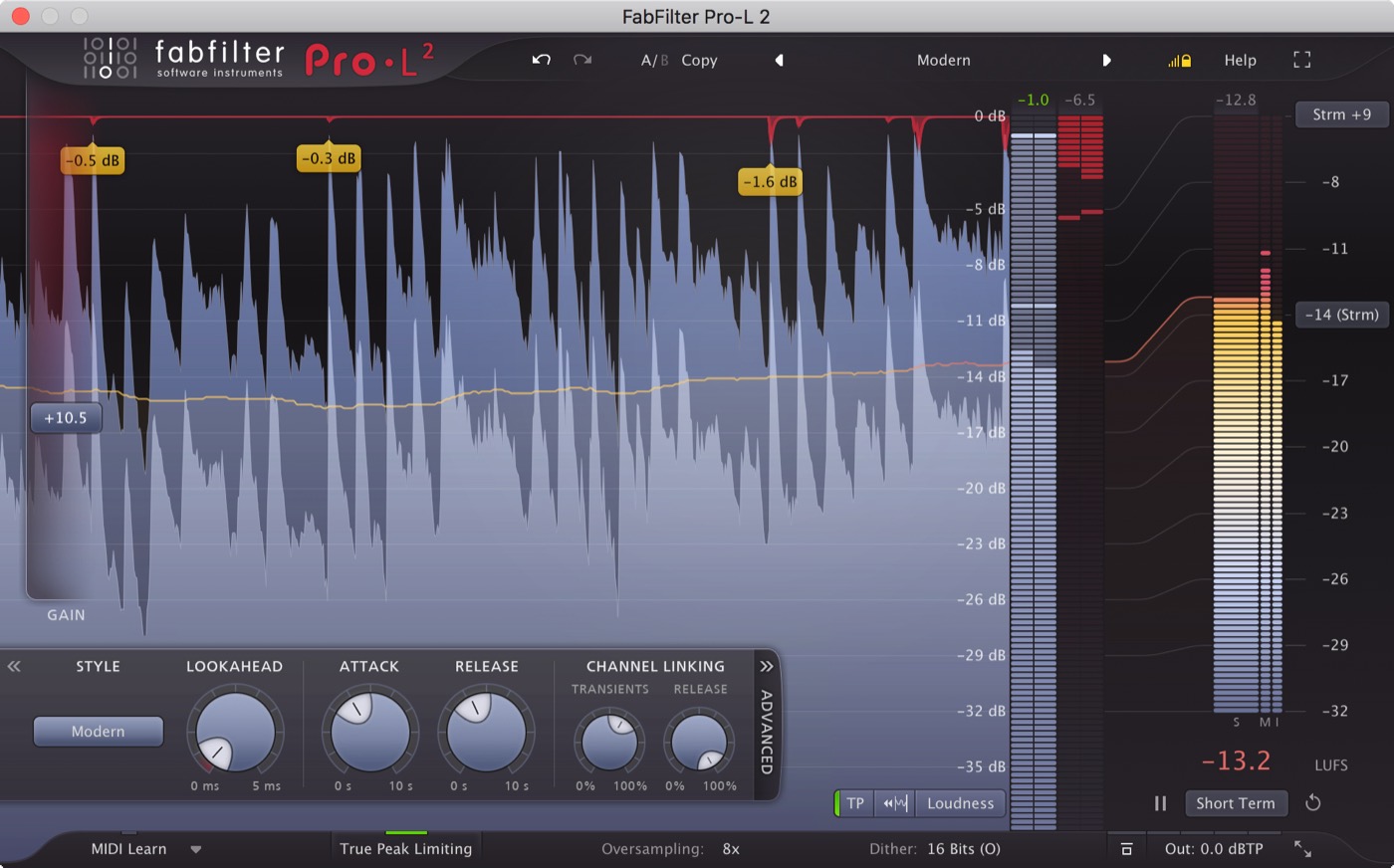
How to tell: bypass it. If the song opens up and the distortion goes, that is your answer. Also watch the gain reduction meter. If it is pinned down and rarely comes back up, the limiter is not limiting peaks any more, it is compressing the whole song.
What that looks like on a limiter.
These are editorial examples, not endorsements or a buying list. Product names and interface images belong to their respective owners.
The fix is to ask it for less. Get the loudness from earlier in the chain by controlling the low end and gluing the loud moments together, so the limiter only has to catch the last decibel or two. If you still need the loudness, accept a quieter master. Streaming turns everything down anyway, which is covered in the guide on LUFS targets.
Cause three: the low end is overloading everything
Low frequencies carry most of the energy in a song. A sub note at 40 Hz moves the meter far more than a hi-hat does, even though you barely hear it on a laptop.
So a rumbling, uncontrolled low end eats all the headroom, the limiter clamps down on every bass note, and the whole song pumps. The distortion sounds like it is in the midrange, but it starts underneath.
How to tell: filter out everything above roughly 200 Hz and listen to what is left. If it is muddy, wandering or has notes at wildly different volumes, that is your problem. Also check whether the kick and bass are fighting in the same place.
The fix is in the mix. High-pass the things that do not need low end. Get the kick and bass to take turns rather than share. Check for rumble below 30 Hz that you cannot hear on your speakers but that is still using up your headroom.
Cause four: the peak between the samples
This one is invisible on a normal meter, which is why it catches so many people.
Your file stores a series of numbers. Your speaker does not play those numbers as steps, it plays a smooth curve drawn through them. That curve can rise higher than any of the stored numbers. A normal peak meter only reads the numbers, so it tells you everything is fine while the actual sound goes over the ceiling.
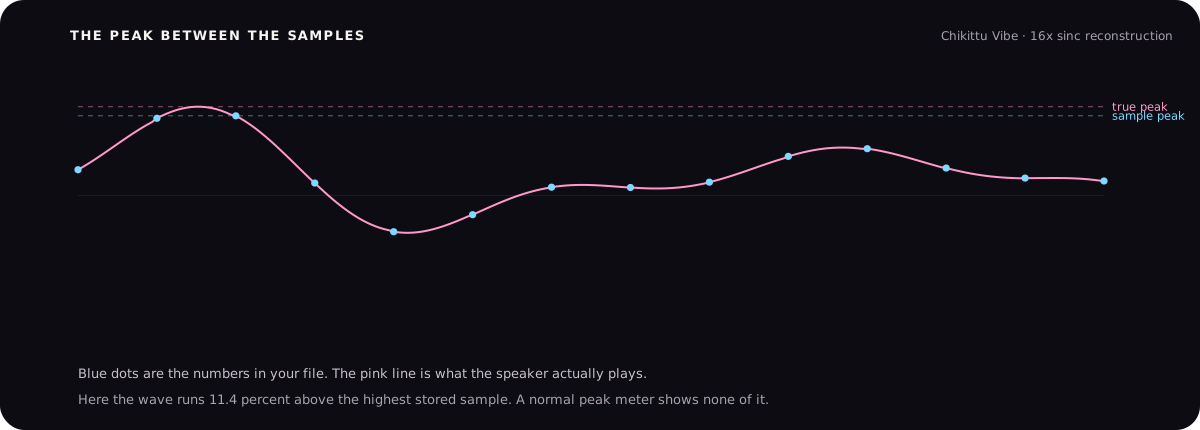
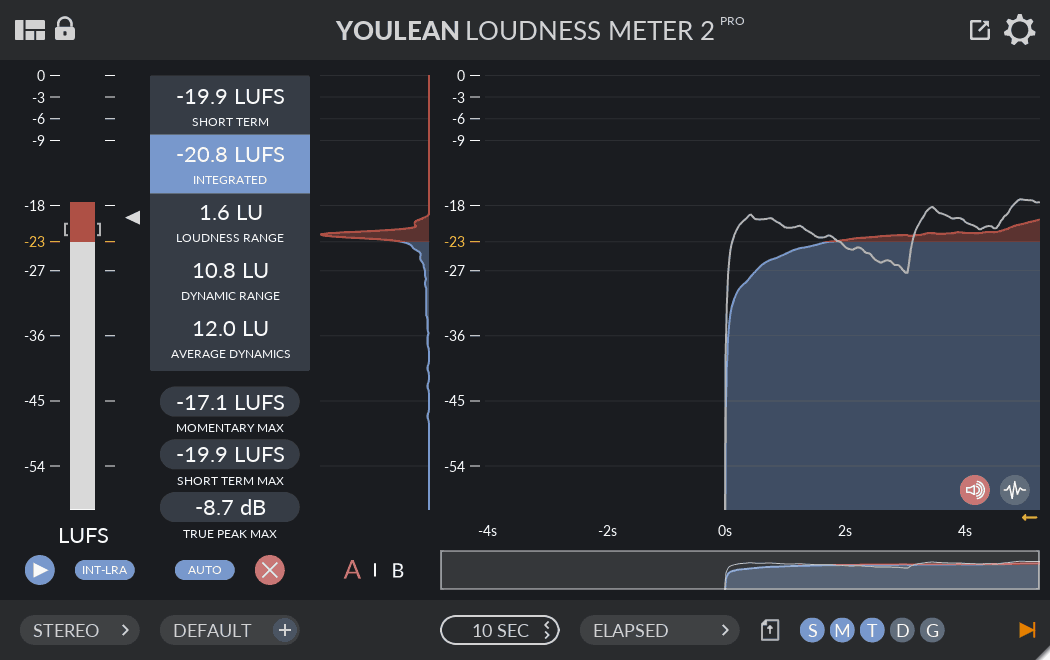
How to tell: switch your meter from sample peak to true peak. If it reads above 0 dBTP, or even close to it, you have this.
A meter that reads the curve, not just the numbers.
These are editorial examples, not endorsements or a buying list. Product names and interface images belong to their respective owners.
The fix is simple. Leave room. Set your ceiling to -1 dBTP, and to -2 dBTP if the master is loud. You lose a decibel of loudness that streaming was going to take off you anyway.
Cause five: it only appears after conversion
You check the WAV and it is clean. You upload it, play it back from the platform, and there is a crackle that was not there before.
This is cause four showing up later. MP3 and AAC do not store your waveform, they store a description of it and rebuild it on playback. The rebuilt wave is close but not identical, and its peaks can land higher than the original. If your master had no headroom, those new peaks have nowhere to go.
How to tell: export an MP3 yourself at 320 kbps, load it back in and listen. If the crackle appears, this is it.
The fix is the same as cause four. Give the master a true peak ceiling of -1 dBTP, and check your master as an MP3 before you upload rather than after. There is more on what conversion does to a file in the WAV versus MP3 guide.
When distortion is the point
Worth saying, because this guide is all about removing it.
Plenty of records are built on distortion. Saturated drums, a driven bass, a vocal pushed through something dirty. That is a sound, and it is a good one.
The difference is where it happens. Distortion you chose, printed into a track in the mix, is part of the music. Distortion that appears at the very end because the file ran out of room is damage, and it lands on everything at once rather than on the thing you wanted to colour.
If you want the grit, put it on the instrument in the mix and leave the master clean.