
An MP3 does not store your song.
It stores a description of your song, and rebuilds something close to it on playback. To keep the file small it throws away the parts it predicts you will not notice, mostly quiet sounds sitting next to loud ones, and everything above a certain frequency.
That is a reasonable trade for listening. It is a worse trade for mastering, because mastering turns things up, and turning up a file means turning up whatever the encoder left behind.
Here is what actually comes off. I took one of my own releases, encoded it, decoded it and measured the result.
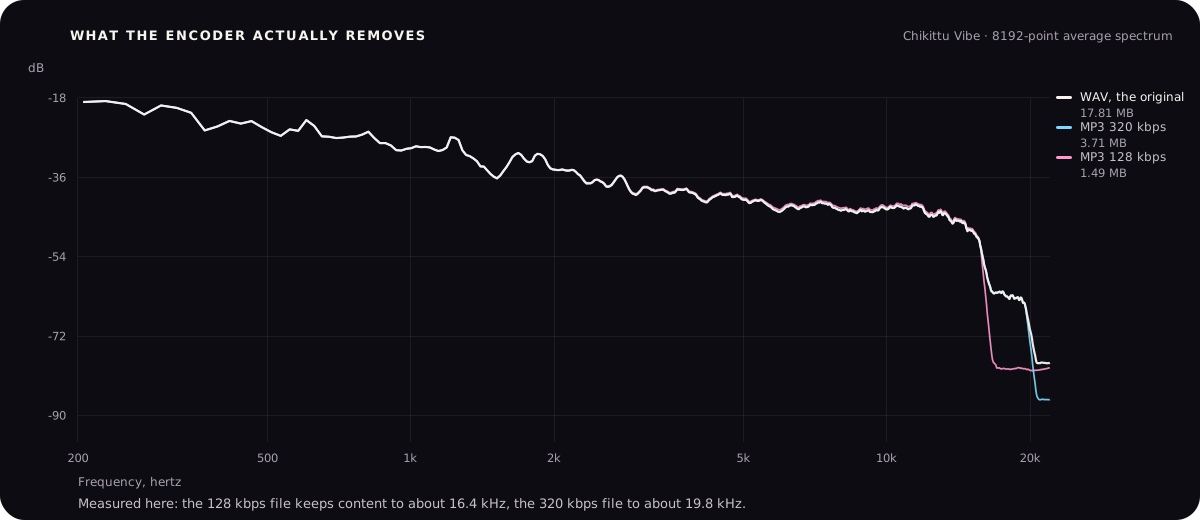
What this actually means: at 320 kbps the difference is small enough that it will not be the reason your master sounds wrong. At 128 kbps you have lost real content and no amount of mastering brings it back.
Why it matters more for mastering than for listening
You can enjoy a 128 kbps file on a bus. The trouble starts when you process it.
Mastering raises the top end so the song has air. On a WAV there is air to raise. On a 128 kbps file the air was removed, so you are raising the edge of a shelf, which sounds thin and brittle rather than open.
Mastering also compresses, which brings quiet detail up. On a WAV that is room tone and reverb tails. On a heavily encoded file it is the artefacts the encoder left behind, which now become audible where they were hidden before.
And the encoder has already changed the peaks. A decoded MP3 does not have the same waveform as the original, so its peaks sit in different places and often higher. Master it, convert it back to MP3 for release, and you have been through the process twice.
Use this rule: every lossy encode is a one-way door. Two doors is noticeably worse than one, and the second one is the one you can avoid.
What to send when you have the choice
| Setting | Send this | Why |
|---|---|---|
| Format | WAV or AIFF | Both store the audio as it is. There is no quality difference between them. |
| Bit depth | 24-bit | More room at the quiet end than 16-bit, and no practical downside. 32-bit float is fine too if your tool accepts it. |
| Sample rate | Whatever your session is | Do not convert. If you worked at 48 kHz, send 48 kHz. Converting adds a step for no benefit. |
| Level | Peaks below 0 dBFS with room to spare | Somewhere around -6 to -3 dBFS is comfortable. The exact number matters far less than not clipping. |
| Length | The full song, start to finish | Include the intro and let the ending ring out. Do not trim silence. |
One thing not on that list: do not normalize the file before sending it. Normalizing just scales the whole thing up, which removes your headroom and gains you nothing.
Where that file ends up on my own tool.
These are editorial examples, not endorsements or a buying list. Product names and interface images belong to their respective owners.
When the WAV is gone
It happens. The drive died, the session will not open, the collaborator disappeared, or the song was bounced on a phone three years ago.
Master it anyway. A good master of a 320 kbps file is a real, releasable master. Refusing to work on it does not get the WAV back.
Find the best copy that exists
Check every drive, email, chat thread and cloud folder. A 320 kbps file and a 128 kbps file sound very different once you process them.
Do not convert it to WAV and pretend
Converting an MP3 to WAV makes a big file containing exactly the same missing information. It fools the file listing and nothing else.
Master more gently than usual
Less top end lift, less compression. You are working with less material, so pushing it harder exposes more.
Do not chase the air that is not there
If the file stops at 16 kHz, adding a high shelf raises hiss and the edge of the shelf. Leave it alone and let the song be a little darker.
Say what it is
If someone else is mastering it, tell them it came from a lossy file. It changes how they approach it, and it stops them hunting a problem they cannot fix.
What format to release
Give every distributor and platform the highest quality file they accept, which is normally a 16-bit or 24-bit WAV at 44.1 kHz or 48 kHz.
Every service makes its own lossy versions for streaming. They will do that from whatever you give them. Hand them an MP3 and they encode your MP3 again, so listeners get the damage twice.
Keep the WAV master somewhere safe as well. Future you will want it for a video, a sync, a remaster or a vinyl cut, and none of those want an MP3.